
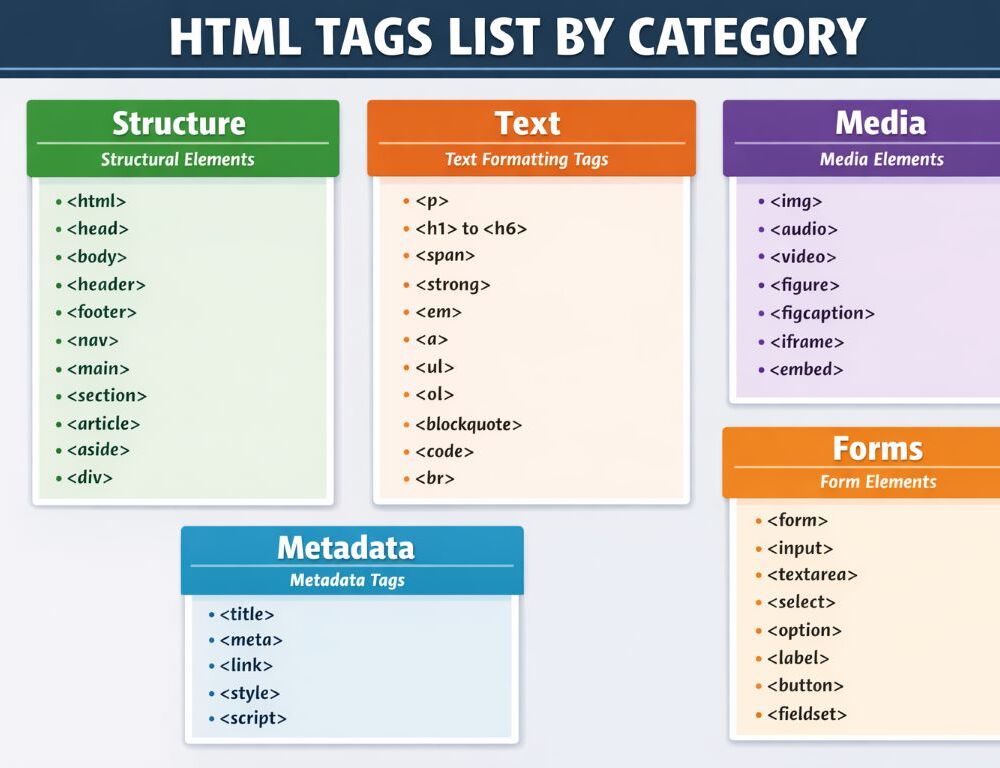
An HTML tags list by category works best when you need a fast reference hub instead of a long theory lesson. This format helps you find the right tag for document structure, text, links, images, tables, and forms without digging through a full tutorial.
This page is built as a beginner friendly reference map. Instead of long theory sections, it uses short tag cards with a one-line purpose and a tiny example. If you need the deeper basics first, start with a separate explainer on the fundamentals of HTML tags.
- How should you use this HTML tags list by category?
- Which document structure HTML tags should beginners learn first?
- Which text HTML tags are most useful for beginners?
- Which HTML tags for links and media should you keep close?
- Which container and layout HTML tags still matter?
- Which HTML tags organize lists and tables best?
- Which HTML tags for forms do beginners use most?
- Which deprecated HTML tags should you avoid now?
- What should you take away from this HTML tags reference hub?
This HTML tags list by category works best as a navigation map between tag groups rather than as a full course.
Use it this way:
- start with document structure tags when building the page frame
- move to text tags when adding readable content
- open the media block when working with links, images, audio, or video
- check the list and table group when organizing repeated content
- use the form group when collecting user input
- compare older code against the deprecated tags block before reusing it
Document structure HTML tags give the page its base before you add text, media, tables, or forms.
<!DOCTYPE html>
Purpose: tells the browser the document uses modern HTML.
Example:<!DOCTYPE html>html
Purpose: wraps the whole HTML document.
Example:<html lang="en">...</html>head
Purpose: contains document level information.
Example:<head>...</head>body
Purpose: contains the visible page content.
Example:<body>...</body>header
Purpose: marks the top part of a page or section.
Example:<header><h1>Page title</h1></header>main
Purpose: marks the main content of the page.
Example:<main><article>...</article></main>section
Purpose: groups a thematic part of the content.
Example:<section><h2>Topic</h2></section>article
Purpose: marks a relatively self contained piece of content.
Example:<article><h2>Post</h2></article>aside
Purpose: separates supporting content.
Example:<aside>Related links</aside>footer
Purpose: marks the lower service area of a page or section.
Example:<footer>© 2026</footer>
Metadata HTML tags matter most at the start when you need to name the document and set its basic supporting information.
title
Purpose: sets the page title shown in the browser tab.
Example:<title>HTML tags list</title>meta
Purpose: provides supporting data such as encoding or description.
Example:<meta charset="UTF 8">link
Purpose: connects an external resource, most often a stylesheet.
Example:<link rel="stylesheet" href="style.css">style
Purpose: adds CSS inside the document.
Example:<style>body { font family: sans serif; }</style>script
Purpose: includes or connects a script.
Example:<script src="app.js"></script>
Text HTML tags are most useful for beginners when writing headings, paragraphs, emphasis, and simple readable content.
h1…h6
Purpose: define heading levels.
Example:<h2>Section</h2>p
Purpose: marks a paragraph of text.
Example:<p>This is a short paragraph.</p>br
Purpose: inserts a line break.
Example:First line<br>Second linehr
Purpose: marks a thematic break in content.
Example:<hr>strong
Purpose: marks strong importance.
Example:<strong>Important</strong>em
Purpose: adds emphasis.
Example:<em>key point</em>blockquote
Purpose: marks a longer quotation.
Example:<blockquote>Quoted text</blockquote>code
Purpose: marks a code fragment.
Example:<code><p></code>pre
Purpose: preserves spacing and line breaks.
Example:<pre>line 1\nline 2</pre>
HTML tags for links and media should stay close when a page needs navigation, images, sound, or video.
a
Purpose: creates a hyperlink.
Example:<a href="/guide">Guide</a>img
Purpose: embeds an image.
Example:<img src="photo.jpg" alt="Image description">figure
Purpose: groups a media object with its caption.
Example:<figure><img src="a.jpg" alt=""><figcaption>Caption</figcaption></figure>figcaption
Purpose: adds a caption tofigure.
Example:<figcaption>Page diagram</figcaption>audio
Purpose: embeds audio.
Example:<audio controls src="sound.mp3"></audio>video
Purpose: embeds video.
Example:<video controls src="clip.mp4"></video>source
Purpose: provides a media source.
Example:<source src="clip.mp4" type="video/mp4">
Container and layout HTML tags still matter when content needs clear grouping without turning the page into a theory lesson.
div
Purpose: groups block level content in a general way.
Example:<div class="card">...</div>span
Purpose: groups a small inline fragment.
Example:<span class="note">new</span>nav
Purpose: groups major navigation links.
Example:<nav><a href="/">Home</a></nav>header
Purpose: works as a top block for a page or section.
Example:<header>...</header>footer
Purpose: works as a bottom block for a page or section.
Example:<footer>...</footer>
HTML tags organize lists and tables best when content repeats in steps, items, rows, or comparisons.
ul
Purpose: creates an unordered list.
Example:<ul><li>Item</li></ul>ol
Purpose: creates an ordered list.
Example:<ol><li>Step 1</li></ol>li
Purpose: marks a list item.
Example:<li>Element</li>table
Purpose: creates a table.
Example:<table>...</table>thead
Purpose: groups the header part of a table.
Example:<thead><tr><th>Name</th></tr></thead>tbody
Purpose: groups the main body rows of a table.
Example:<tbody><tr><td>Data</td></tr></tbody>tr
Purpose: creates a table row.
Example:<tr><td>Cell</td></tr>th
Purpose: marks a header cell.
Example:<th>Price</th>td
Purpose: marks a standard data cell.
Example:<td>199</td>
HTML tags for forms do the most work when a page needs to collect input from a user.
form
Purpose: wraps related input fields into one form.
Example:<form action="/send" method="post">...</form>label
Purpose: labels a form field.
Example:<label for="email">Email</label>input
Purpose: creates an input field.
Example:<input type="email" id="email">textarea
Purpose: adds a multiline text field.
Example:<textarea name="message"></textarea>button
Purpose: creates an action button.
Example:<button type="submit">Send</button>select
Purpose: creates a choice list.
Example:<select><option>Yes</option></select>option
Purpose: adds one choice insideselect.
Example:<option value="1">First</option>fieldset
Purpose: groups related form fields.
Example:<fieldset>...</fieldset>legend
Purpose: gives a title tofieldset.
Example:<legend>Contact details</legend>
Deprecated HTML tags should be avoided now because modern HTML and CSS provide clearer replacements.
font
Old purpose: set font face or size.
Better now: CSS.
Example:<font size="4">Text</font>center
Old purpose: center content.
Better now: CSS.
Example:<center>Heading</center>big
Old purpose: enlarge text.
Better now: CSS.
Example:<big>Text</big>strike
Old purpose: strike through text.
Better now:sor CSS depending on meaning.
Example:<strike>Old price</strike>frameset
Old purpose: build pages with frames.
Better now: modern layout patterns and separate documents.
Example:<frameset cols="25%,75%">...</frameset>
This HTML tags reference hub works best as a starting map for page structure by category. Begin with the group that matches your task, use the core tags for structure, text, media, lists, or forms, and then expand your own example library as your pages become more specific.