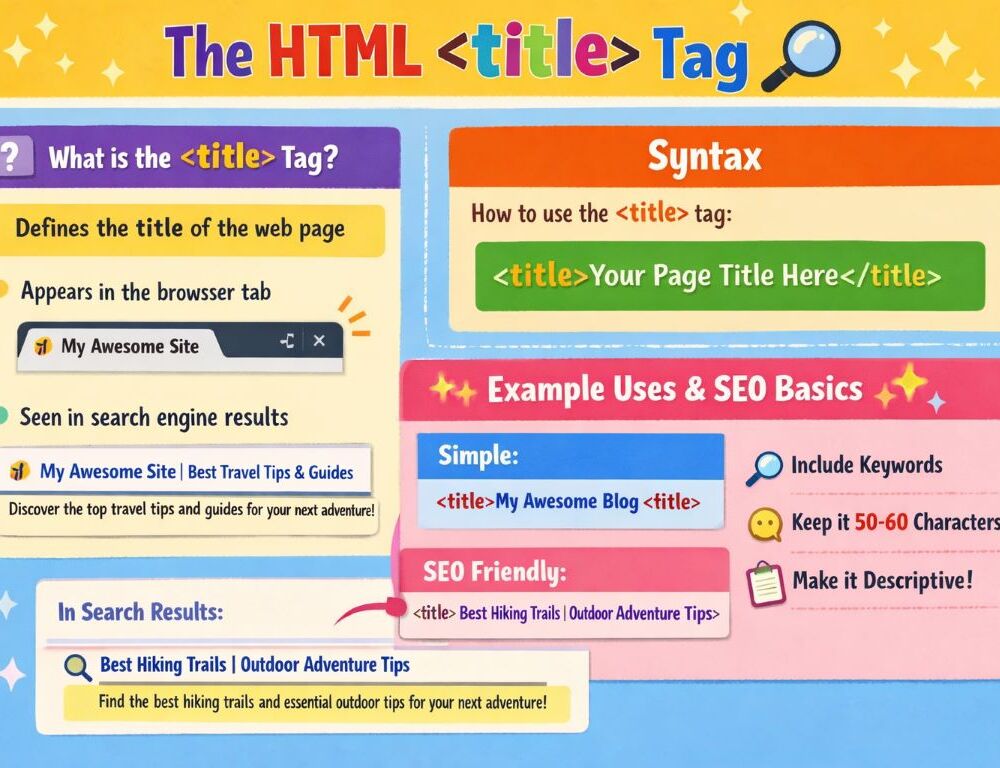
The HTML title tag defines the document title shown in a browser tab and helps identify the page before a user reads the visible content. The HTML title tag contains text only and works inside head, not inside the visible page content.
This topic should not be confused with the global title attribute. Here, the focus is the <title> element inside the document head rather than advisory text attached to individual interface elements.
- What is the HTML title tag and what does the title tag in HTML do?
- Where does the title tag go in HTML?
- What is the correct syntax of the HTML title tag?
- Which title tag HTML attributes actually matter?
- What is the difference between head, the HTML title tag, and h1 on a page?
- Is there a separate HTML meta title tag, or is it the title element?
- How should you use the HTML title tag for basic SEO without stuffing?
- Which HTML title tag examples are most useful for beginners?
- Which mistakes should you avoid when using the title tag in HTML?
- What should you remember about the HTML title tag?
What is the HTML title tag and what does the title tag in HTML do?
The HTML title tag defines the title of the overall document rather than the visible heading of the page content.
Its role is straightforward. The browser uses this text for the tab title, while search results and bookmarks can also use it to represent the page. That makes the title tag in HTML important both for document structure and for how a page is recognized outside its main content.
Where does the title tag go in HTML?
The title tag in HTML goes inside head, which means it belongs to the document setup layer before body.
The basic order looks like this:
<!DOCTYPE html><html><head><title><body>
When the HTML tag title is placed correctly, the document structure stays clear and easy to maintain. That placement check is one of the fastest ways to confirm that the page setup is organized properly.
What is the correct syntax of the HTML title tag?
The correct syntax of the HTML title tag is simple: opening tag, document title text, closing tag.
<!DOCTYPE html><html lang="en"><head> <meta charset="UTF-8"> <title>HTML Title Tag</title></head><body> <h1>Page example</h1></body></html>One detail matters from the start. The title HTML tag should contain text rather than page markup. Keeping the element text-only is the safer and cleaner rule.
Which title tag HTML attributes actually matter?
The title tag HTML element does not have a separate set of special attributes that carries its main value.
In practice, the important part is the title text itself. That means most real improvement work happens in the wording of the document title rather than in a special attribute strategy attached to the tag.
A useful rule follows from that. If you want a better HTML title tag, improve the wording, not the attribute strategy. That keeps the work focused on the part that actually matters.
What is the difference between head, the HTML title tag, and h1 on a page?
Head, the HTML title tag, and h1 on a page serve different purposes, even though beginners often mix them together.
A practical split looks like this:
headcontains the supporting part of the documenttitledefines the document titleh1defines the main visible heading of the page content
That means the title tag does not replace h1, and h1 does not replace title. One belongs to document setup, and the other belongs to the visible reading experience. Keeping that difference clear makes page structure easier to manage.
Is there a separate HTML meta title tag, or is it the title element?
A separate HTML meta title tag does not exist as a standard element, and in most practical SEO discussions people mean the title element when they say “meta title.”
In everyday workflow, “meta title” is often just a shorthand label for the text inside <title>. Technically, it is more accurate to think in terms of the title element itself rather than inventing a separate HTML tag for it.
That distinction keeps the terminology cleaner. When working in code, think about <title>. When working in SEO language, remember that the conversation usually still points to the same element.
How should you use the HTML title tag for basic SEO without stuffing?
The HTML title tag should be used for SEO as a short, specific, readable page title rather than as a compressed list of keyword variations.
A practical checklist looks like this:
- place the main topic near the beginning
- avoid repeating the same phrase mechanically
- keep each page title unique
- avoid vague titles such as “Home” when the page has a specific subject
- balance clarity, relevance, and natural wording
A strong title HTML tag gives the reader a clear signal before the page is opened. That is why clarity usually matters more than aggressive repetition.
Which HTML title tag examples are most useful for beginners?
The most useful HTML title tag examples for beginners show a basic page title, a clearer article title, and an SEO-aware version that still reads naturally.
What does a basic title tag in HTML example look like?
A basic title tag in HTML example uses a short and clear document name.
<title>My First HTML Page</title>That is enough for a learning example where the goal is simply to understand how the element works in a document.
What does an HTML tag title example for SEO look like?
An HTML tag title example for SEO works best when it combines topic clarity, useful scope, and natural wording.
<title>HTML Title Tag: Syntax, Examples, and SEO Basics</title>This format is stronger because it tells both users and search systems what the page is about without turning the title into a keyword list. That is the kind of pattern worth copying in real page work.
Which mistakes should you avoid when using the title tag in HTML?
The most common mistakes with the title tag in HTML usually come from weak title wording rather than from raw syntax errors.
The biggest ones are these:
- leaving a page without a meaningful
title - using titles that are too short or too generic
- repeating the same title across many pages
- stuffing multiple keyword variations into one title
- confusing the title element with
h1or the globaltitleattribute
If the page title is accurate, unique, descriptive, and aligned with the page content, most beginner-level issues are already handled. That is a strong quality check to keep.
What should you remember about the HTML title tag?
The HTML title tag sets the document title, lives inside head, contains text only, and does not replace the visible h1 on the page. For both clarity and basic SEO, the strongest pattern is a title that is unique, descriptive, readable, and weighted toward the main topic early in the text.