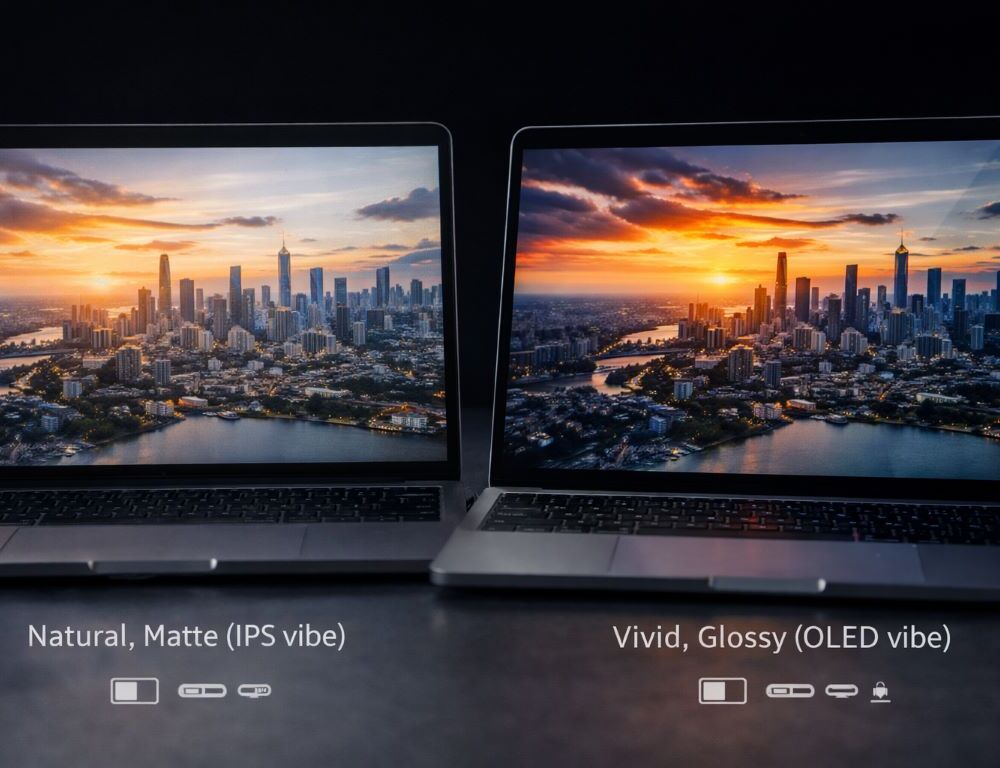
A laptop display isn’t a spec you glance at once—it’s what you stare at for hours. That’s why IPS vs OLED for laptops isn’t just about numbers; it’s about comfort, clarity, and how you actually use your machine. Some people want deep blacks and punchy contrast, others want predictable text readability and fewer reflections. Let’s compare IPS and OLED in real life, focus on the specs that matter, and match the screen to your workload.
Quick verdict: who should choose IPS and who should choose OLED?
If you’re new to the topic, start with what is a laptop in simple terms so the IPS vs OLED trade-offs below feel more intuitive.
When does IPS make the most sense?
IPS is often the practical pick for work, school, and everyday use. It tends to deliver stable viewing angles, a consistent look across brightness levels, and lots of model options at different price points.
When does OLED deliver the “wow” factor?
OLED stands out for contrast and black levels, which can look incredible for movies, photos, and creative work. If you care about rich visuals and true-looking dark scenes, OLED can feel like an upgrade you notice instantly.
What should you decide before comparing panels?
Your use case. If you haven’t mapped your needs yet, it helps to revisit guidance like how to choose a laptop for your needs, because the best screen choice depends on how you spend your hours, not on marketing.
What are the real-world differences between IPS and OLED?
Brightness: how many brightness nits do you actually need?
Brightness nits matter most in bright rooms and near windows. For home and office use, moderate brightness can be enough, while outdoor or sunlit spaces need more headroom. Both IPS and OLED vary widely by model, so judge the specific display, not just the panel type.
Color: why does sRGB coverage matter more than “punchy” colors?
sRGB coverage is a practical baseline for everyday accuracy. Poor coverage can make everything look washed out, even if the panel is otherwise decent. For photo and design, wider gamuts can help, but strong sRGB is the minimum for a satisfying look.
Flicker: what is PWM flicker and why do some people get tired faster?
PWM flicker is one way screens control brightness, and it can cause eye strain for sensitive users, especially at low brightness. If comfort matters to you, check reviews for flicker behavior and how the panel performs in dim settings.
Table: match your scenario to display priorities
| Scenario | What matters most | What you can de-emphasize |
| Office and school | Matte vs glossy comfort, low flicker | Max saturation “wow” |
| Movies and streaming | Contrast, blacks, brightness | Perfect sRGB accuracy |
| Photo and design | sRGB coverage, consistency, calibration | Ultra-high refresh rate |
| Gaming | 60 vs 120 Hz, response, brightness | Studio-level color |
| Heavy reading | Uniformity, matte comfort | Extreme contrast |
60 vs 120 Hz: when is refresh rate worth it?
Who benefits most from 120 Hz?
If you scroll constantly, work on timelines, game, or simply love smooth motion, 120 Hz is an upgrade you’ll feel. It’s not mandatory, but it can make the whole interface look more fluid.
When is 60 Hz perfectly fine?
For school, office work, and typical daily use, 60 Hz is fine if the panel is bright enough and doesn’t flicker in an annoying way. A good 60 Hz screen beats a mediocre 120 Hz one.
Why doesn’t refresh rate fix a bad screen?
Because comfort is a bundle: brightness, uniformity, coating, and flicker. Refresh rate is only one piece.
Matte vs glossy: how should you choose?
Why do people love matte for work?
Matte coatings reduce reflections and help in mixed lighting. If you type, read, and sit near windows, matte can feel calmer and more predictable.
When does glossy look better?
Glossy often looks more vivid, especially for media. The tradeoff is reflections, which can be distracting in cafés or bright rooms.
Can accessories solve the coating issue?
Films exist, but they can reduce sharpness and shift colors. It’s better to choose the coating that fits your environment from the start.
Questions that speed up the decision
How do you know OLED isn’t worth it for you?
If you live in static interfaces all day and don’t want to think about brightness habits and long-term panel behavior, a strong IPS panel can be the safer, simpler choice.
Is OLED a good idea on the used market?
It can be, but inspection matters more. If you’re shopping secondhand, use a guide like how to buy a used laptop safely and check for burn-in, uniformity issues, and panel defects.
Is the display more important than the CPU?
For many people, yes. You feel the CPU during occasional heavy moments, but you feel the display every minute. It also helps to be honest about what laptops are used for in your routine—work, school, media, or a mix—so the “right” screen becomes obvious. IPS vs OLED becomes an easy choice when you stop chasing labels and focus on real priorities: brightness nits, sRGB coverage, PWM flicker, refresh rate, and matte vs glossy. Pick the panel that matches your day, and you’ll enjoy the screen long after the spec sheet is forgotten.