
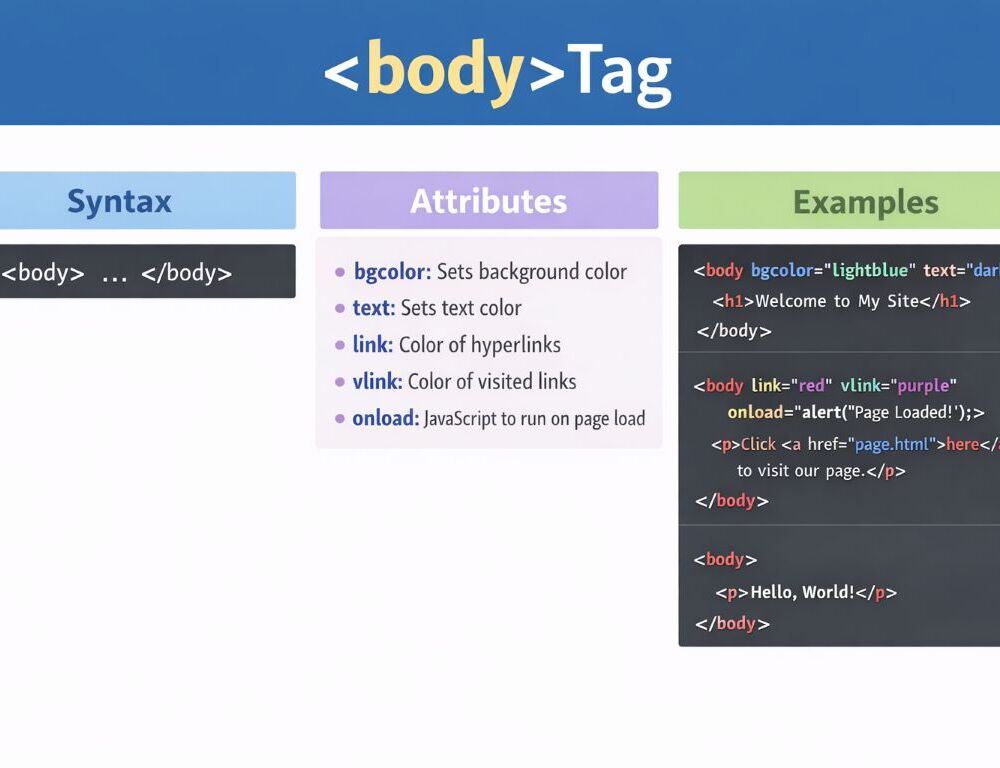
The HTML body tag contains the visible content of a page. Headings, paragraphs, images, links, tables, forms, and the rest of the rendered document content live inside this element.
This page focuses on the practical role of body. The goal is to understand where the tag sits in the document structure, which attributes still make sense, which older options are deprecated, and how to think about scripts and linked resources in relation to it.
- What is the body tag in HTML and what does it do?
- What is the correct syntax of the body tag in HTML?
- Which HTML body tag attributes still matter today?
- Which body tag attributes in HTML are deprecated?
- Can you use multiple body tags in HTML?
- What is the difference between the head and body tag in HTML?
- Can script and link tags go inside the body?
- What are the most useful HTML body tag examples for beginners?
- Which mistakes should you avoid when using the body tag in HTML?
- What should you remember about the HTML body tag?
What is the body tag in HTML and what does it do?
The body tag in HTML holds the visible content of the document, while head holds the supporting and document-level information.
The simplest way to remember the split is this: if something should be displayed as part of the page, it almost always belongs in body. If it is document metadata, setup information, or a supporting resource connection, it usually belongs in head.
That distinction makes document structure much easier to read and debug.
What is the correct syntax of the body tag in HTML?
The correct syntax of the body tag in HTML is simple: opening tag, page content, closing tag.
<!DOCTYPE html><html lang="en"><head> <meta charset="UTF-8"> <title>Page example</title></head><body> <h1>Page heading</h1> <p>Main document content.</p></body></html>In a normal page structure, body comes after head and acts as the second major block inside html. That basic frame is enough for most beginner examples.
Which HTML body tag attributes still matter today?
For the HTML body tag, the attributes that still matter today are usually standard global attributes and, when needed, specific event handlers.
The most practical ones are these:
classfor styling hooksidfor a unique identifierstylefor limited inline styling when necessarydata-*for custom data- event attributes such as
onloadwhen a specific case needs them
That set is enough for most real page work. If the goal is to control appearance, CSS is the better tool than old presentational body attributes.
What does a simple html body tag attributes example look like?
A simple html body tag attributes example can start with safe modern attributes.
<body class="home-page" id="top"> <h1>Home page</h1></body>This example shows the normal role of class and id without falling back to outdated presentation settings.
Which body tag attributes in HTML are deprecated?
Many older body tag attributes in HTML are deprecated because they tried to control presentation directly in markup.
The most common examples are these:
bgcolorbackgroundtextlinkvlink- older page margin attributes such as
topmarginandleftmargin
The modern approach is straightforward. Background color, background image, text color, and page spacing should be handled through CSS. That keeps page structure cleaner and easier to maintain.
How should you handle background image in html body tag?
For background image in html body tag, the correct modern approach is CSS instead of the old background attribute.
<body class="landing"> <h1>Landing page</h1></body>body.landing { background-image: url("bg.jpg"); background-size: cover;}This keeps structure and styling separate, which is the better long-term pattern.
A valid HTML document should contain only one body tag.
If a page needs large content regions, the right solution is not to add more body elements. The right solution is to use sections, articles, containers, and other structural elements inside one body.
That is one of the quickest structure checks you can make in any page.
What is the difference between the head and body tag in HTML?
The difference between the head and body tag in HTML is that head stores document-level setup and metadata, while body stores the visible page content.
A useful working split looks like this:
headfor title, metadata, styles, and document setupbodyfor text, images, navigation, tables, forms, and the rest of the rendered content
Once that split is clear, reading and fixing markup becomes much easier.
script and link should be treated differently when thinking about body, because their practical role is not the same.
A simple beginner rule is this:
- stylesheet links through
linkusually belong inhead scriptcan be placed near the end ofbodywhen that helps loading order- script execution order should be planned on purpose, not left to accidental placement
That guideline is enough for most beginner pages. Keeping styles in head and handling scripts deliberately leads to a cleaner and more predictable structure.
What are the most useful HTML body tag examples for beginners?
The most useful HTML body tag examples for beginners show basic visible content, safe modern attributes, and a clean separation between structure and styling.
What does a basic body tag html example look like?
A basic body tag html example shows the simplest visible page content.
<body> <h1>Hello</h1> <p>This is the page content.</p></body>This example makes the core idea clear: everything the user reads on the page sits inside body.
What does a body tag attributes in html example look like?
A body tag attributes in html example can begin with a simple class and id combination.
<body class="docs-page" id="page-top"> <h1>Documentation</h1></body>That is enough to show the role of current attributes without returning to deprecated presentation attributes.
Which mistakes should you avoid when using the body tag in HTML?
The most common mistakes with the body tag in HTML usually come from page structure choices rather than from raw syntax.
The biggest ones are these:
- adding more than one
bodytag to a document - mixing document setup with visible page content
- using deprecated presentational attributes for color or background
- placing styles randomly where
headwould make more sense - relying on presentation instead of clean document structure
Keeping one basic model in mind reduces most of these problems: one body, visible content inside it, and CSS for presentation.
What should you remember about the HTML body tag?
The HTML body tag holds the visible content of the document, should appear only once, and works best when it is not overloaded with outdated presentational attributes. The practical rule to keep is simple: one body per document, clean structure inside it, and CSS for appearance.