
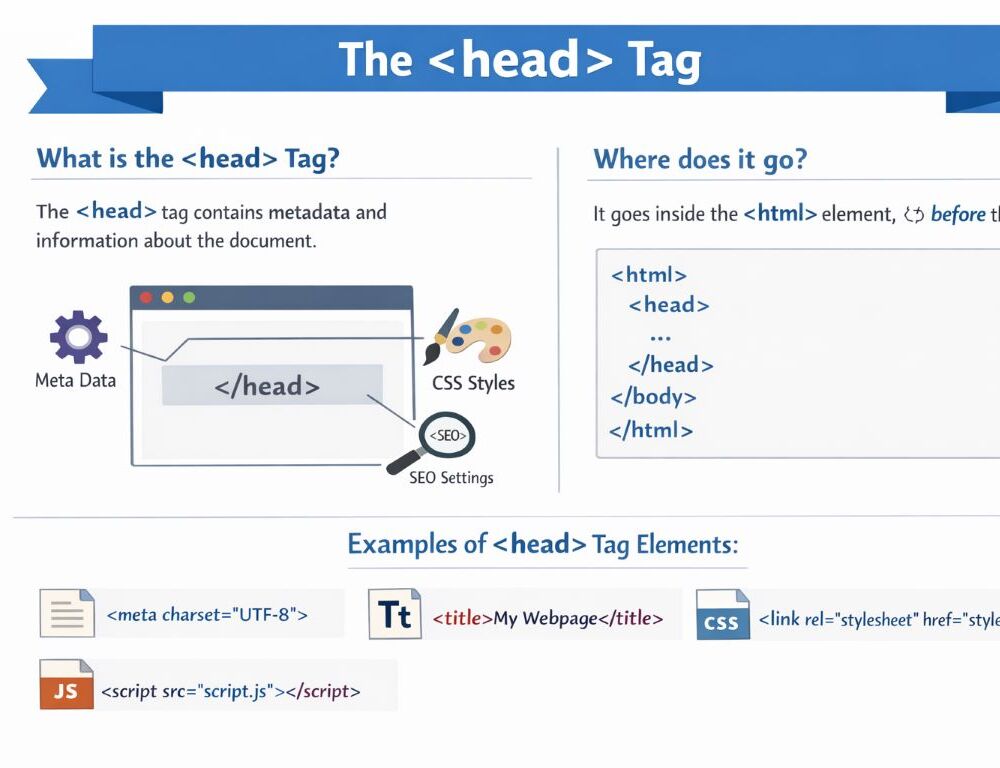
The HTML head tag contains the supporting part of a document rather than the visible page content. This is where a page usually keeps its title, metadata, stylesheet connections, browser-facing settings, and other document-level elements.
It is important not to confuse head with header. The head element belongs to the structure of the whole document, while header belongs to the visible page content and works as a top block for a page or section.
- What is the head tag in HTML and what does the HTML head tag do?
- Where does the head tag go in an HTML document?
- What is the correct syntax of the head tag in HTML?
- Which tags are most often used inside the HTML tag for head?
- What is the difference between the head and title tag in HTML?
- What is the difference between the head and body tags in HTML?
- What does a good head HTML tag example look like?
- Which mistakes should you avoid when using the head tag in HTML?
- What should you remember about the HTML head tag?
What is the head tag in HTML and what does the HTML head tag do?
The head tag in HTML holds metadata and supporting document connections.
A simple working rule helps here. If something is needed by the browser, the search engine, or the document setup, but is not meant to appear as the main visible content of the page, it usually belongs in head. That includes the page title, character encoding, description, stylesheet links, some scripts, and other supporting elements.
People also search for this as head html tag, head tag html, or head tag in html, but the role stays the same in every version of the query.
Where does the head tag go in an HTML document?
The head tag in an HTML document goes inside html and before body.
The normal order looks like this:
<!DOCTYPE html><html><head><body>
This order matters because it keeps document structure readable and predictable. When head is misplaced or mixed with visible content, the page becomes harder to maintain and review.
What is the correct syntax of the head tag in HTML?
The correct syntax of the head tag in HTML is simple: opening tag, supporting document content, closing tag.
<!DOCTYPE html><html lang="en"><head> <meta charset="UTF-8"> <title>Page example</title></head><body> <h1>Page heading</h1></body></html>In this example, head contains the character encoding and page title, while body contains the visible content. That separation is the normal base structure for a clean HTML document.
The HTML tag for head most often contains title, meta, link, style, script, and sometimes base.
In practical terms, they usually work like this:
titlesets the page title shown in the browser tabmetaprovides supporting information such as encoding or descriptionlinkconnects outside resources, most often stylesheetsstyleadds CSS directly inside the documentscriptincludes or connects a scriptbasesets a base address for relative links when that is truly needed
For beginners, the most important ones to understand first are title, meta, and link.
What is the difference between the head and title tag in HTML?
The difference between the head and title tag in HTML is that head is the container for supporting document elements, while title is one specific element inside that container.
In other words, title does not replace head. It belongs inside head. In practical use, head gathers the document setup information, while title handles the actual page name shown in the browser tab.
<head> <title>My page</title></head>This example shows the relationship clearly. Title is part of head, not a separate alternative to it.
The difference between the head and body tags in HTML is that head contains document setup information, while body contains the visible page content.
A useful working split looks like this:
headfor page title, metadata, styles, and document setupbodyfor text, images, navigation, tables, forms, and the rest of the rendered content
This is one of the most important structural splits in beginner HTML.
What does a good head HTML tag example look like?
A good head HTML tag example should stay short and show only the most useful starting elements.
<head> <meta charset="UTF-8"> <title>HTML head tag example</title> <meta name="description" content="Short page description"> <link rel="stylesheet" href="style.css"></head>This example makes the main logic easy to see. Head does not hold the visible page text, but it prepares the document to work correctly in the browser.
Which mistakes should you avoid when using the head tag in HTML?
The most common mistakes with the head tag in HTML usually come from misunderstanding its purpose rather than its syntax.
The biggest ones are these:
- placing visible page content inside
head - confusing
headwithheader - leaving a page without a
title - mixing supporting connections randomly between
headandbody - adding extra elements without understanding their role
If you remember that head describes the document instead of displaying the main content, most of these mistakes become much easier to avoid.
What should you remember about the HTML head tag?
The HTML head tag is used for the supporting part of the document. It appears before body, is not meant for visible page content, and usually contains title, meta, link, style, and other document-level elements. Once the roles of head and body are clearly separated, the page structure becomes much cleaner and easier to manage.