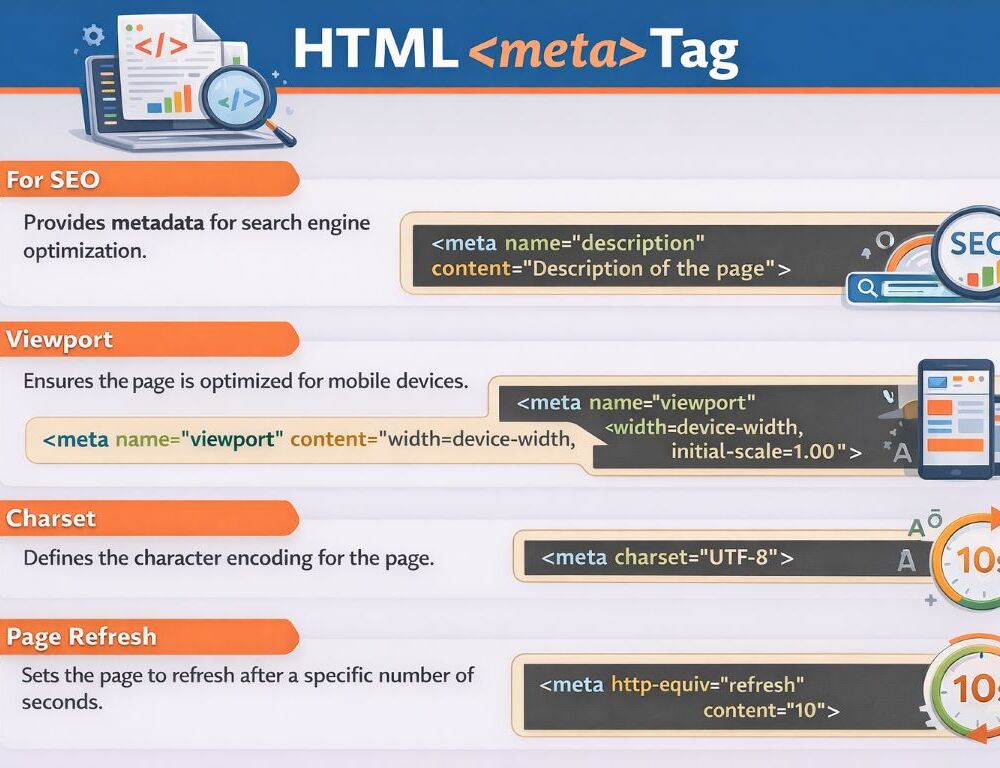
HTML meta tags are used for document metadata that browsers, search engines, and other clients read in the head of a page rather than in the visible body content. For a basic page template, the best starting set is usually a correct charset, a mobile-friendly viewport setting, and a clear page description.
The practical rule is simple: do not fill the head with every meta pattern you have seen before. A starter template works best when it includes only the tags that solve a real page-level need.
- What are HTML meta tags and what are they used for?
- Which HTML meta tags should go first in a basic page template?
- What does the HTML meta tag charset actually do?
- What does the viewport meta tag do in HTML?
- Which HTML meta tags actually matter for search and which do not?
- When should you use refresh or redirect with an HTML meta tag?
- What does a clean basic template with HTML meta tags look like?
- Which mistakes should you avoid when using HTML meta tags?
- What should you remember about HTML meta tags?
HTML meta tags add document-level metadata that helps browsers process a page correctly and helps search engines or other clients understand selected page settings.
In practical terms, html meta tags are easiest to understand in groups. Some support technical rendering, such as charset and viewport. Others help define search-facing or crawler-facing behavior, such as description and robots. A third group covers special-purpose cases such as http-equiv="refresh".
If you keep that split in mind, the meta tag in HTML becomes much easier to use without overloading the template.
HTML meta tags in a starter template should usually be added in this order: charset, viewport, description, and then only the extra tags that solve a real page-level need.
A practical first-pass list looks like this:
<meta charset="utf-8"><meta name="viewport" content="width=device-width, initial-scale=1"><meta name="description" content="Short page summary">
For most normal pages, that set is already enough. Add more only when the page has a clear technical or search-related requirement.
What does the HTML meta tag charset actually do?
The HTML meta tag charset declares the character encoding of the document and helps the page display text correctly across languages and scripts.
A basic version looks like this:
<meta charset="utf-8">This is one of the first tags worth checking when text looks broken, characters turn into strange symbols, or multilingual content renders incorrectly. It is a small line that prevents a large class of avoidable display issues.
What does the viewport meta tag do in HTML?
The viewport meta tag in HTML tells the browser how to handle page width and initial scaling, which matters especially on phones and smaller screens.
The standard starter version looks like this:
<meta name="viewport" content="width=device-width, initial-scale=1">Without this tag, a page can look zoomed out, too wide, or awkward to read on mobile. That is why the viewport meta tag HTML pattern belongs in most modern starter templates.
For search, the HTML meta tags that matter most in normal page work are description and, in specific cases, robots, while keywords should not be treated as a necessary modern tag.
A practical rule set looks like this:
- use
descriptionto summarize the page clearly - use
robotsonly when the page needs indexing or display control - skip
keywordsin a modern basic template - remember that not every meta tag is a useful search signal
This helps keep html meta tags for seo practical rather than historical or bloated. A clean template is usually more useful than a long list of weak additions.
When should you use refresh or redirect with an HTML meta tag?
An HTML redirect meta tag based on http-equiv="refresh" should usually be treated as a fallback, not as the preferred redirect method.
A simple example looks like this:
<meta http-equiv="refresh" content="0; url=/new-page">This means html meta tag refresh behavior can work, but it should not be the default decision in a basic template. When a page needs a real redirect, starting with a server-side solution is usually the cleaner and safer approach.
A clean basic template with HTML meta tags should include only the pieces that solve the common setup problems first: encoding, viewport behavior, a useful page description, and the title.
<head> <meta charset="utf-8"> <meta name="viewport" content="width=device-width, initial-scale=1"> <meta name="description" content="Short page summary"> <title>Page title</title></head>This kind of structure stays readable, easy to maintain, and flexible enough for most starter pages. If the page later needs more control, add only the specific tag that solves that next requirement.
The most common mistakes with HTML meta tags usually come from unnecessary or poorly chosen tags rather than from syntax alone.
The biggest ones are these:
- forgetting
charset - omitting
viewporton pages that should work well on mobile - expecting value from
keywords - adding
robotswithout a clear reason - using
refreshas a routine replacement for proper redirects - treating the
headlike a dump for every old meta pattern you have seen
If you ask one simple question after each tag, “What problem does this solve on this page?”, the template stays much cleaner and easier to trust.
HTML meta tags work best when a basic template contains only the tags that are truly needed: charset, viewport, description, and, when required, robots or refresh. For a strong starting template, that is enough: correct encoding, mobile-friendly viewport behavior, a useful page summary, and no unnecessary clutter in the head.