
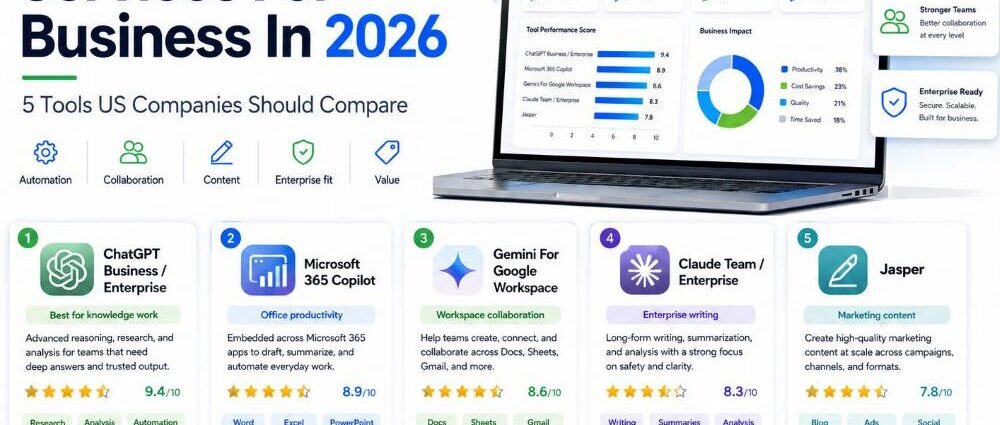
Choosing the best AI services for business is not only about picking the most famous tool. A small company, a marketing team, a sales department, and an enterprise IT team may all need very different things from AI software.
Some teams want a general AI assistant that can help with writing, research, planning, coding, and analysis. Others need AI inside the apps they already use every day, such as Microsoft 365 or Google Workspace. Marketing teams may care more about brand voice and campaign content, while document-heavy teams may need careful long-form reasoning and file analysis.
This review compares five well-known AI tools for US companies: ChatGPT Business / Enterprise, Microsoft 365 Copilot, Gemini For Google Workspace, Claude Team / Enterprise, and Jasper. The goal is not to name one perfect winner, but to show which AI service fits which business need best.
- Best AI Services For Business: Ratings, Features, And Fit
- What Makes An AI Service Useful For Business?
- 5 Best AI Services For Business Reviewed
- Which Type Of AI Tool Fits Your Business Best?
- How To Choose The Best AI Service For A US Business
- What To Avoid When Choosing An AI Service For Business
- Best AI Services For Business: Final Comparison
Best AI Services For Business: Ratings, Features, And Fit
| AI Service | Company | G2 Rating | Best Business Fit |
| ChatGPT Business / Enterprise | OpenAI | 4.6, 2,242 reviews | General business AI for writing, research, analysis, coding, and everyday productivity |
| Microsoft 365 Copilot | Microsoft | 4.4, 321 reviews | AI help inside Word, Excel, Outlook, Teams, PowerPoint, and Microsoft 365 workflows |
| Gemini For Google Workspace | 4.4, 430 reviews | AI tools for Gmail, Docs, Sheets, Meet, Drive, and Google Workspace teams | |
| Claude Team / Enterprise | Anthropic | 4.6, 234 reviews | Long documents, careful writing, research, structured thinking, and analysis-heavy work |
| Jasper | Jasper | 4.7, 1,270 reviews | AI marketing content, brand voice, campaign workflows, and content production |
The table gives a quick first look, but it should not be the only way a company chooses. The best AI tool for business depends on where the team already works, what kind of tasks slow people down, and how much control the company needs over data, users, and brand consistency.
What Makes An AI Service Useful For Business?
A useful AI service should solve a real workflow problem. It should not feel like a separate toy that employees try once and forget. For most US businesses, the tool needs to fit into daily work: emails, meetings, documents, spreadsheets, research, customer conversations, marketing plans, or internal knowledge.
There are also practical questions. Does the company need admin controls? Will employees use it across teams, or only inside one department? Does it connect with Microsoft 365, Google Workspace, CRM tools, files, or marketing systems? Is the main need content, research, coding, data analysis, automation, or meeting support?
This is why the best AI software for business is rarely the same for every company. A Microsoft-heavy organization may get more value from Copilot. A Google Workspace team may prefer Gemini. A marketing department may move faster with Jasper. A research-heavy or document-heavy team may shortlist Claude. A business that wants one flexible AI assistant for many types of work may start with ChatGPT.
5 Best AI Services For Business Reviewed
1. ChatGPT Business / Enterprise
ChatGPT Business is OpenAI’s business-focused version of ChatGPT, built for teams that want shared workspaces, admin controls, privacy features, and access to advanced AI models. For many companies, ChatGPT is the easiest AI service to understand because it can help across many everyday tasks instead of being tied to one narrow department.
Who It Is Best For
ChatGPT is best for businesses that want a flexible AI assistant for many types of work. It is useful for writing, editing, brainstorming, coding help, spreadsheet thinking, research, customer-support drafts, meeting preparation, and quick internal explanations.
It is especially practical for teams that are still figuring out how AI should fit into daily operations. Instead of choosing a very specialized platform first, a company can use ChatGPT for business as a broad starting point across marketing, operations, sales, product, HR, and leadership work.
Reviews And Ratings
ChatGPT holds a 4.6 G2 rating from 2,242 reviews. Many users describe it as easy to use, helpful for quick answers, and useful for writing, code, studying, research, and everyday problem-solving.
The review profile is strong, but companies should remember that ChatGPT is a broad AI assistant. It can support many tasks, but it still needs good prompts, human review, and clear rules for sensitive business information.
Key Features
ChatGPT Business includes a shared workspace, admin controls, access to advanced models, data analysis, deep research, coding support, custom workspace tools, and privacy-focused business features. ChatGPT Enterprise adds more advanced deployment, security, and administrative options for larger organizations.
The main strength is flexibility. Teams can use it for short tasks, long analysis, creative work, technical help, or internal knowledge support.
Business Use Cases
US companies can use ChatGPT for business writing, sales emails, content outlines, customer response drafts, SOPs, research summaries, data interpretation, code support, hiring materials, training documents, and leadership planning.
It is also useful when teams need a general business AI assistant that can move between departments without being locked into one workflow.
Support And Security
ChatGPT Business is designed for teams that need privacy, workspace controls, and easier user management than individual accounts. Larger organizations may prefer Enterprise if they need more advanced security, compliance, and deployment support.
Companies should still create internal AI rules, especially for customer data, confidential documents, legal work, financial decisions, and anything that needs expert review.
Bottom Line
ChatGPT is one of the strongest AI services for business when a company wants a broad, flexible tool that many departments can use. It is not the most specialized option for every workflow, but it is often the easiest place to start.
For US companies that want one AI assistant for writing, research, analysis, coding, and daily productivity, ChatGPT Business is a natural first shortlist option.
2. Microsoft 365 Copilot
Microsoft 365 Copilot is Microsoft’s AI assistant for work, built into the Microsoft 365 ecosystem. It is designed for companies that already use Word, Excel, Outlook, Teams, PowerPoint, SharePoint, OneDrive, and other Microsoft tools every day.
Who It Is Best For
Microsoft 365 Copilot is best for businesses that already run on Microsoft 365. If a company’s work happens inside Outlook, Teams, Excel, Word, and PowerPoint, Copilot can feel more natural than a separate AI app.
It is especially useful for teams that want help with meeting summaries, email drafts, document creation, spreadsheet work, presentation support, and finding information across work files.
Reviews And Ratings
Microsoft Copilot holds a 4.4 G2 rating from 321 reviews. G2 review summaries point to strong praise for Microsoft app integration, time savings, email drafting, document summarization, and context-aware help.
At the same time, some users mention that answers can be generic or may need extra checking. That is important for business users: Copilot can speed up work, but it does not remove the need for human judgment.
Key Features
Microsoft 365 Copilot works across familiar Microsoft apps such as Word, Excel, PowerPoint, Outlook, and Teams. Microsoft also offers Copilot Chat, work-data grounding, agent features, and enterprise-grade security, privacy, and compliance options depending on the plan.
The biggest feature is not just AI chat. It is AI inside tools that many businesses already use every day.
Business Use Cases
A US company may use Microsoft 365 Copilot to summarize Teams meetings, draft emails, turn notes into documents, create first-draft presentations, analyze spreadsheet information, find files, and reduce time spent switching between apps.
It is a strong AI productivity tool for business when the team already lives inside Microsoft 365.
Support And Security
Copilot is built with Microsoft’s business ecosystem in mind, which makes it attractive for IT teams that care about access controls, work accounts, compliance, and company data policies.
The tool is strongest when the company already has Microsoft 365 properly set up. If files, permissions, and data structures are messy, Copilot may be less useful until the internal setup improves.
Bottom Line
Microsoft 365 Copilot is one of the best AI tools for business when a company already depends on Microsoft apps. It is not the best fit for teams that mostly use Google Workspace or separate SaaS tools, but it can be very practical for Microsoft-first organizations.
For US businesses that want AI inside their existing office work, Copilot may be easier to adopt than a standalone AI platform.
3. Gemini For Google Workspace
Gemini For Google Workspace is Google’s AI assistant built into Gmail, Docs, Sheets, Meet, Drive, and other Workspace tools. It is a strong choice for companies that already use Google Workspace for communication, files, documents, meetings, and collaboration.
Who It Is Best For
Gemini is best for businesses that work heavily in Gmail, Google Docs, Google Sheets, Google Drive, and Google Meet. It is especially useful for teams that want AI help without moving away from the Google tools they already know.
It is a good fit for companies that need email support, document drafting, meeting summaries, research help, spreadsheet assistance, and quick content creation inside Google Workspace.
Reviews And Ratings
Gemini holds a 4.4 G2 rating from 430 reviews. G2 review summaries highlight its Google ecosystem integration, productivity support, research help, and content creation value.
Some users also note that responses may sometimes be generic or struggle with more complex requests. Like every AI service, Gemini works best when users review important outputs before using them in business decisions.
Key Features
Gemini is built into Google Workspace apps and can help with writing, summarizing, organizing, planning, and creating content. Google also offers Gemini Enterprise as a broader AI platform for teams that want to discover, create, share, and run AI agents in a secure business environment.
The main advantage is Google ecosystem fit. For teams already working in Gmail, Docs, Sheets, Drive, and Meet, Gemini can reduce the need to copy information between tools.
Business Use Cases
US companies can use Gemini to summarize long email threads, draft responses, create document outlines, help with meeting notes, organize spreadsheet ideas, support research, and work across shared files.
It can also be useful for teams that want AI tools for business communication, internal documentation, and everyday productivity inside Google Workspace.
Support And Security
Google presents Gemini for Workspace as an AI assistant with enterprise-grade security and privacy. For larger companies, Gemini Enterprise may be more relevant when AI agents, governance, and wider workflow automation become important.
As with any AI software for US businesses, internal policies still matter. Teams should decide what data can be used, who can access AI features, and which outputs require review.
Bottom Line
Gemini is one of the best AI services for business when a company already runs on Google Workspace. It is especially useful for teams that want AI inside Gmail, Docs, Sheets, Drive, and Meet rather than a separate standalone tool.
For Google-first companies, Gemini is often the most natural AI productivity option.
4. Claude Team / Enterprise
Claude Enterprise is Anthropic’s business-focused plan for deploying Claude across organizations with governance, data controls, and admin infrastructure. Claude Team is aimed at growing teams, while Enterprise is built for larger companies that need more control, security, and deployment support.
Who It Is Best For
Claude is best for teams that work with long documents, careful writing, structured thinking, research, analysis, and complex internal knowledge. It is especially useful for legal, consulting, operations, product, research, finance, and technical teams that need thoughtful outputs rather than quick one-line answers.
It can also be a strong choice for companies that care about explainability, review, and controlled enterprise AI use.
Reviews And Ratings
Claude holds a 4.6 G2 rating from 234 reviews. Users often praise Claude for clear writing, strong reasoning, helpful explanations, and the ability to handle more complex work.
As with other AI tools, businesses should not treat every answer as final. Claude can help draft, analyze, and organize information, but important business decisions still need human review.
Key Features
Claude Team and Enterprise support shared work, collaboration, long-form tasks, and business use across teams. Claude Enterprise is built around governance, data controls, identity management, audit needs, and admin infrastructure for companies that need a more controlled rollout.
Anthropic also offers Claude-related tools for coding and agentic work, which can make it more useful for engineering and operations teams.
Business Use Cases
US companies can use Claude for contract review support, policy drafts, research summaries, meeting prep, long-document analysis, internal knowledge work, product planning, technical writing, and structured business analysis.
It is especially useful when a team needs an AI assistant that can stay organized across longer material and produce careful, readable outputs.
Support And Security
Claude Enterprise is designed for companies that need stronger governance, data controls, and security review. Anthropic also provides a Trust Center for compliance and security documentation, which matters for larger or regulated organizations.
For smaller teams, Claude Team may be easier to adopt, while larger companies may prefer Enterprise for central control.
Bottom Line
Claude is one of the strongest AI services for businesses that need careful writing, long-document work, research, and structured analysis. It may not be the most obvious choice for teams that only want AI inside Microsoft or Google apps, but it stands out when quality of reasoning matters.
For US companies with document-heavy work, Claude should be on the shortlist.
5. Jasper
Jasper is an AI marketing platform built for content teams, brand teams, and campaign work. Unlike broader AI assistants, Jasper is more focused on marketing output, brand voice, content pipelines, and helping teams create consistent materials at scale.
Who It Is Best For
Jasper is best for marketing teams that need on-brand content across campaigns, blogs, landing pages, emails, ads, social posts, and other customer-facing materials.
It is especially relevant for companies that already know AI can write content, but need more control over tone, messaging, brand rules, and repeatable marketing workflows.
Reviews And Ratings
Jasper holds a 4.7 G2 rating from 1,270 reviews. That gives it one of the strongest review profiles in this group, especially for a specialized AI marketing tool.
Its rating strength makes sense because Jasper is not trying to be everything for every department. It is built around a more specific buyer: marketers who need content production, brand control, and campaign support.
Key Features
Jasper focuses on AI marketing content, brand voice, content workflows, campaign creation, and marketing team collaboration. Its Brand Voice features help teams keep writing closer to company style, tone, and messaging rules.
The strongest feature is focus. Jasper is not just a general chatbot. It is built around marketing work.
Business Use Cases
A US marketing team might use Jasper to create blog drafts, email campaigns, landing page copy, social posts, ad variations, product descriptions, content briefs, and brand-aligned messaging.
It can also help teams move faster when they need many content variations for different audiences, products, or campaign stages.
Support And Security
Jasper is more relevant when a company needs AI inside a marketing workflow, not just individual writing help. Teams should still use editorial review, plagiarism checks when needed, brand approvals, and subject-matter review before publishing.
For larger marketing teams, the main value is consistency. Jasper can help reduce scattered one-off AI use and give the team a more controlled content process.
Bottom Line
Jasper is the strongest fit in this list for marketing teams that need an AI marketing platform rather than a general business assistant. It is especially useful for companies that care about brand voice, campaign speed, and repeatable content production.
For US businesses focused on marketing output, Jasper is easier to justify than a broader AI tool that does not understand brand workflow as clearly.
Which Type Of AI Tool Fits Your Business Best?
Different companies need different AI tools, so the shortlist should start with the business model and daily workflow.
Best AI Tool For Everyday Business Work
ChatGPT is the easiest first choice for general business AI. It can help with writing, planning, research, coding, analysis, internal documents, and many everyday tasks that do not belong to one specific department.
Best AI Tool For Microsoft 365 Teams
Microsoft 365 Copilot is the most natural choice for companies already using Word, Excel, Outlook, Teams, PowerPoint, SharePoint, and OneDrive. It is strongest when employees want AI help inside tools they already use.
Best AI Tool For Google Workspace Teams
Gemini is the better fit for businesses built around Gmail, Docs, Sheets, Drive, and Meet. It keeps AI close to daily communication and document work.
Best AI Tool For Marketing Teams
Jasper is the most focused choice for marketing teams. It is built for brand voice, content production, campaign assets, and repeatable content workflows.
Best AI Tool For Long Documents And Research
Claude stands out for teams that need careful writing, document analysis, structured reasoning, and longer-form work. It is especially useful when quality and clarity matter more than quick short answers.
Best AI Tool For Small Businesses In The US
Small businesses in the US usually need simple adoption, flexible use cases, and clear value. ChatGPT is often the easiest first step, while Microsoft 365 Copilot or Gemini may be better if the company already works heavily inside one of those ecosystems.
Best Enterprise AI Tool For US Companies
Enterprise AI tools for US companies should offer admin controls, security, privacy, user management, and governance. Microsoft 365 Copilot, Gemini Enterprise, ChatGPT Enterprise, and Claude Enterprise all belong in this conversation, but the best fit depends on the company’s existing tech stack.
How To Choose The Best AI Service For A US Business
A US company should choose an AI service based on real workflow fit, not hype. The first question is simple: where does the team already work every day?
If the company runs on Microsoft 365, Copilot deserves serious attention. If the company runs on Google Workspace, Gemini may be easier to adopt. If the team needs a flexible assistant across many departments, ChatGPT is a strong starting point. If the work is document-heavy, Claude may be the better fit. If the main need is marketing content and brand consistency, Jasper makes more sense.
A few practical questions can make the decision easier:
- Does the team need a general AI assistant or a specialized AI platform?
- Will employees use it inside Microsoft 365, Google Workspace, or a separate app?
- Is the main need writing, research, meetings, analysis, coding, marketing, or automation?
- Does the company need admin controls, SSO, governance, or compliance support?
- Will the tool connect to company files, emails, documents, or customer data?
- Is the pricing still practical if adoption grows across the team?
The best AI software for business is the one employees will actually use and managers can actually control.
What To Avoid When Choosing An AI Service For Business
A polished AI product page can make every tool sound useful, but some warning signs are worth watching.
- The tool sounds impressive but does not clearly fit any daily workflow
- Pricing looks simple for one user but becomes expensive for a full team
- There are weak admin controls for business use
- Security and data privacy details are hard to understand
- The tool does not connect well with the company’s existing apps
- The outputs sound generic and require heavy rewriting
- Employees use it in scattered ways with no review process
- The company has no rules for sensitive data or AI-generated content
A good AI service for business should make work easier without creating confusion about data, quality, or ownership.
Best AI Services For Business: Final Comparison
The best AI services for business are not interchangeable. Each one makes the most sense in a different situation.
ChatGPT Business / Enterprise is the best broad choice for companies that want a flexible AI assistant across many departments. Microsoft 365 Copilot is the strongest fit for businesses that already live in Microsoft apps. Gemini For Google Workspace is the natural option for Google Workspace teams. Claude Team / Enterprise is a strong match for long documents, careful analysis, and structured thinking. Jasper is the clearest choice for marketing teams that need brand-controlled content and campaign workflows.
The right decision depends less on which AI tool is most famous and more on how well it fits the company’s daily work. For most US businesses, the smartest move is not to chase every new AI product. It is to pick the service that fits the team’s tools, tasks, data rules, and growth stage.